
FIELD NOTES / LINUX SECURITY
Building an Ubuntu security lab and establishing a baseline.
A baseline is most useful when it comes from evidence. For this lab, I built an Ubuntu virtual machine, documented its users, services, packages, and network exposure, then translated the raw output into three concrete security risks.
The objective: build, inspect, then assess.
This CYBR 203 lab began with three objectives: create a working system, identify its components, and establish a baseline security posture. The deliverable required more than showing a successful installation. I also needed to document the operating system, installed services, network configuration, open ports, and default users, then explain the risks revealed by that evidence.
The purpose was to preserve the initial state and identify what needed attention—not to quietly change the system before documenting it.
A reproducible ARM64 Ubuntu lab.
I created the Ubuntu-Security-Lab virtual machine in UTM using its QEMU virtualization engine. The saved configuration used an ARM64 architecture with four CPU cores, 8 GB of memory, 30 GB of storage, and hardware OpenGL acceleration. Ubuntu was attached as the boot image.
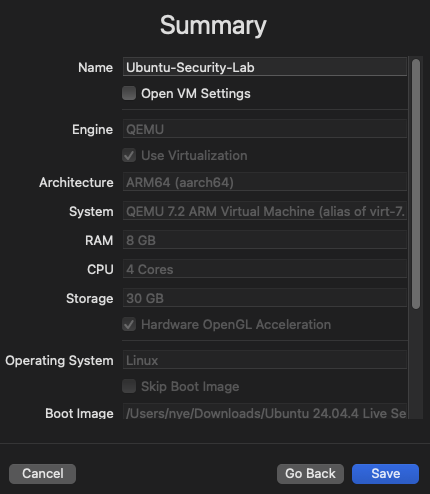
Keeping the lab isolated in a VM made it possible to inspect, change, and later harden the environment without placing the host system at risk. It also created a known platform that could be revisited for later identity, storage, patching, and container-security exercises.
Install the operating system and desktop environment.
During the Ubuntu installation, I used the standard server option, accepted the DHCP network configuration for interface enp0s1, configured guided storage with LVM, created the local nye account, and installed OpenSSH Server. I did not add any featured server snaps.
After the server installation completed, I updated the package index and installed the Ubuntu desktop packages to add a graphical environment.
# Check for package and dependency updates
sudo apt update

# Install the task package manager
sudo apt install tasksel

# Install the Ubuntu desktop environment
sudo apt install ubuntu-desktop
This expanded the system beyond a minimal server build. That choice was important to the later assessment because desktop components introduced additional packages and background services that became part of the attack-surface review.
Turn the system state into reviewable evidence.
Once the VM was operational, I collected the information required by the lab. Each command answered a specific baseline question: which OS was running, which ports were listening, which services were active, how the network was configured, which accounts could use a shell, and how many packages were installed.
# Identify the operating system
lsb_release -a

# Find open TCP and UDP ports
sudo netstat -tuln

# List running services
systemctl list-units --type=service --state=running

# Record the network configuration
ip addr
ifconfig

# Find accounts with an interactive shell
cat /etc/passwd | grep -E "/bin/bash|/bin/sh"

# Count installed packages
dpkg -l | wc -l
The commands produced a repeatable snapshot rather than a visual guess based on the desktop. That distinction matters: a service can be active without a visible application window, and a listener can expose the system even when the corresponding feature is not being used intentionally.
What the inspection found.
The VM received 192.168.64.6/24 on interface enp0s1. The assessment identified four listening ports, two local user accounts, 35 running services, and 1,687 installed packages.
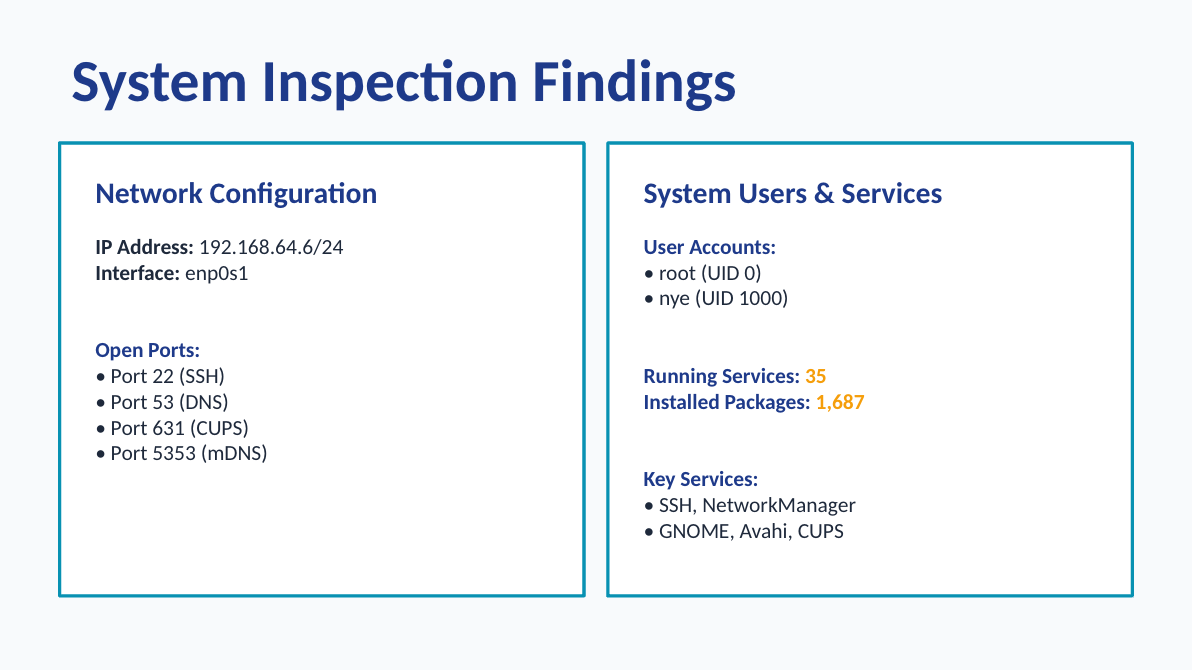
22/SSH, 53/DNS, 631/CUPS, and 5353/mDNS.
root with UID 0 and nye with UID 1000.
Including SSH, NetworkManager, GNOME, Avahi, and CUPS.
The desktop installation significantly expanded the software footprint.
Three risks emerged from the baseline.
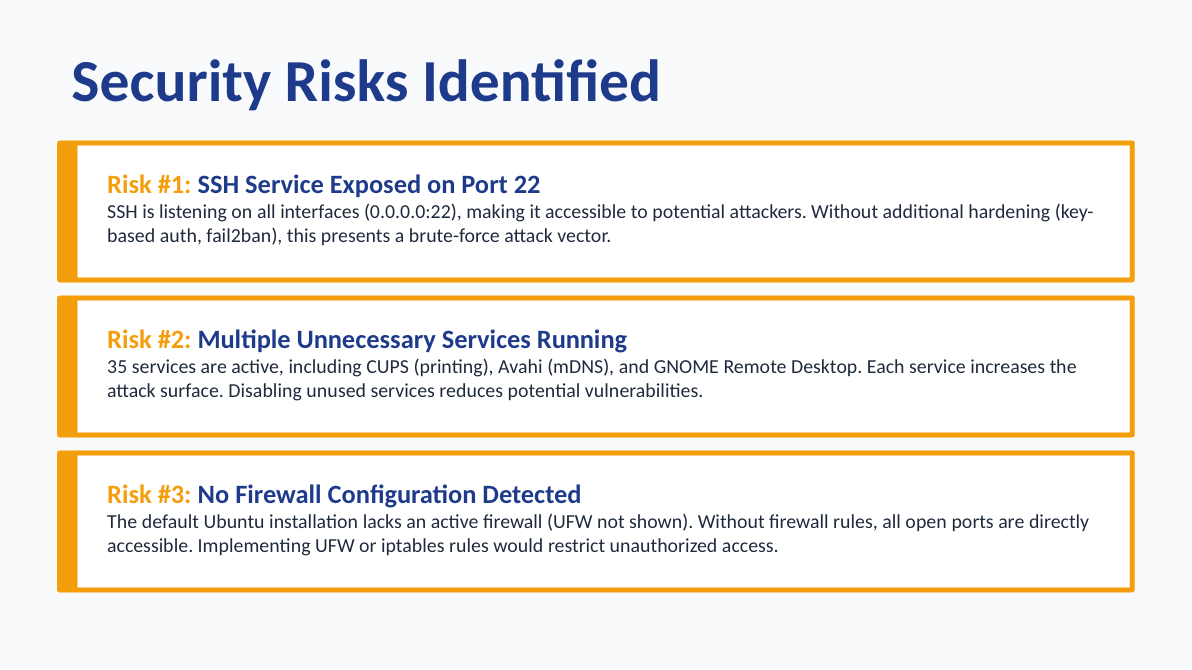
The raw findings became useful only after connecting them to exposure and impact. I documented three conditions that deserved follow-up.
SSH exposed on port 22
SSH was listening on all interfaces at 0.0.0.0:22. Without additional controls such as key-based authentication or brute-force protection, the service created a remote attack path.
Multiple unnecessary services running
The 35 active services included CUPS, Avahi/mDNS, and GNOME Remote Desktop. Every unneeded service adds code, configuration, and potential vulnerabilities to the attack surface.
No active firewall configuration detected
UFW was not shown as active during the assessment. Without host firewall rules, the listening services depended on external network controls to limit access.
The baseline defined the next hardening priorities.
The assessment did not treat every installed component as a vulnerability. Instead, it created a list of questions that could be validated before making changes: Is SSH required? Which teams or workflows need printing and mDNS? Should the desktop environment be present on this system? Which inbound connections should the host accept?
- Restrict and harden SSH if remote administration is required.
- Disable services that have no documented owner or operational purpose.
- Enable and validate a host firewall policy using UFW or an equivalent control.
- Repeat the same inspection after hardening to prove the system state changed as intended.
THE TAKEAWAY
The value of a baseline is making assumptions visible.
Building the VM was only the first step. The security work began when installation choices were translated into observable users, packages, services, and ports—and those observations were turned into specific risks and defensible next actions.
Explore the related hardening projects